

A change in application code might look minor: an extra write to DynamoDB, a new queue, an environment variable, or a parameter for an existing service. It is only during deployment that it turns out the application lacks the required IAM permissions, the resource has an incorrect configuration, or the new feature affects other parts of the environment.
Adding a new feature to an application often entails a change in the infrastructure: a new IAM policy, an AWS resource, an environment variable, or a configuration change in an existing service. Who is responsible for such changes depends on the operating model adopted in the organization. Most commonly, we encounter 2 approaches:
Model 1
The backend developer prepares and maintains the cloud resources needed for their application on their own. In mature projects, they usually rely on Infrastructure as Code tools such as Terraform or Pulumi for this purpose.
Model 2
The bulk of the responsibility for the infrastructure falls to the DevOps team. They are responsible for the security and configuration of AWS accounts, as well as for deploying the application services used by developers.
This article focuses on the second approach. I describe where misunderstandings and extra iterations between backend developers and the DevOps team used to stem from, and how we solved this problem using an AI skill that analyzes infrastructure requirements before a change reaches the environment.
The Process as a Problem: Manual Fixes, Communication Gaps, and Incomplete IAM Permissions
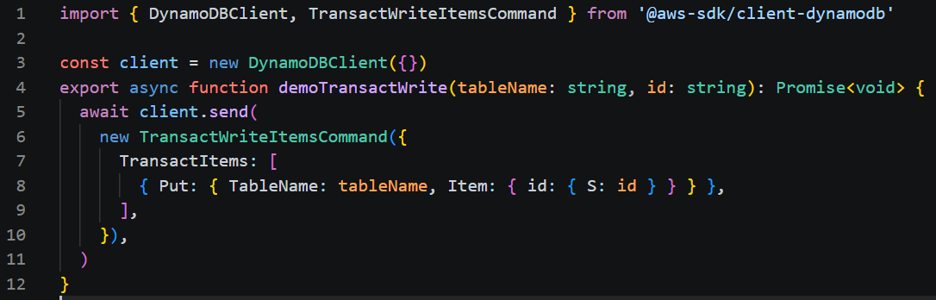
Imagine a backend developer adding support in the application to save data to multiple DynamoDB tables within a single transaction. They implement the logic, finish local testing, and create a Jira ticket for the DevOps team:
„Need DynamoDB permissions"
The Lambda function fails with an AccessDeniedException, the ticket goes back for clarification, the DevOps team applies another change, and the backend developer re-tests the solution.
In short: the issue wasn't access to DynamoDB itself, but an imprecisely defined requirement.
- The backend developer implemented the business logic.
- They then submitted a request to create or modify AWS resources, described in an imprecise manner (e.g., due to time pressure).
- The DevOps team prepared the infrastructure following the Principle of Least Privilege, based on the Jira description.
- The backend developer tested the application in the environment.
- Only then did it become apparent that permissions, a resource, or a configuration were missing.
The problem did not stem from a single bug in the application or infrastructure code. Information about infrastructure requirements appeared too late, was passed manually, and often lacked crucial details: specific IAM actions, queue parameters, or required environment variables.
This was a direct result of several factors:
-
imprecise task descriptions,
-
lack of broader infrastructure knowledge,
-
project pressure forcing tasks to be completed "quickly" at the expense of brief, laconic tickets.
As a result, gaps were uncovered during environment testing—at a stage when fixing them required another iteration between teams. This applied to both new modules and seemingly minor code changes, such as adding write permissions to a given resource.
We needed a way to detect these dependencies earlier: before a change reaches the environment, and ideally before implementation even begins.
How We Shifted AWS Requirements Analysis Left (Before Implementation)
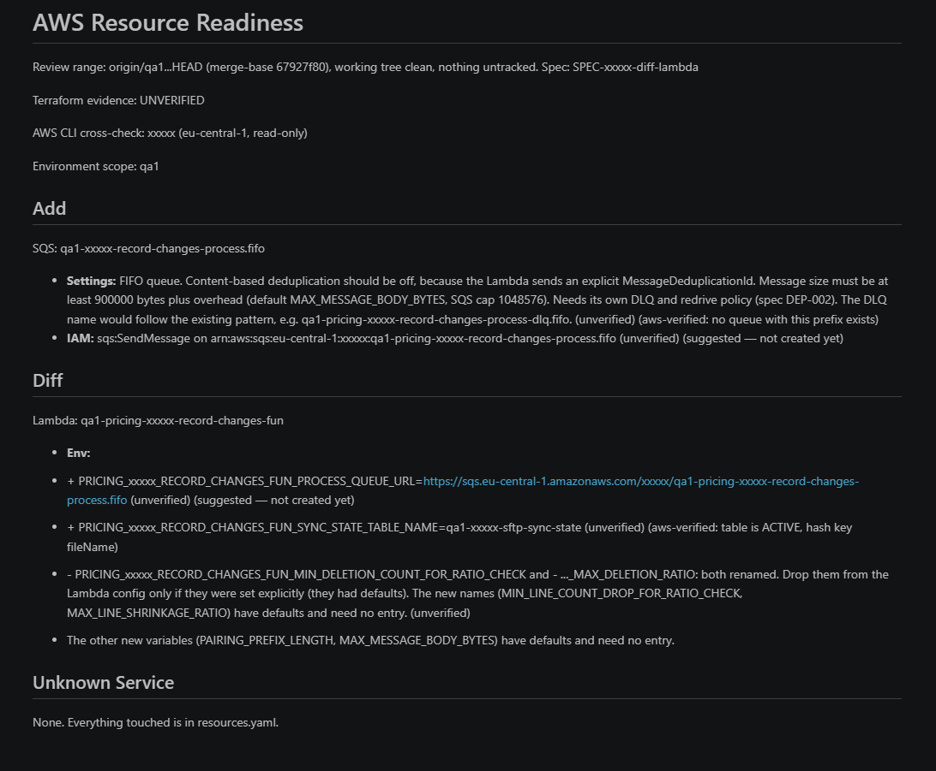
To mitigate these issues, we created the pre-implement-aws-resources skill. The backend developer runs it before handing the change over to the DevOps team—ideally before implementation or during the planning phase.
Previously, backend developers created prompts on their own and asked language models to analyze infrastructure needs. Consequently, the results depended heavily on how the query was formulated and did not always adhere to project standards (which can be elevated using the skill described here).
Today, the backend developer runs the skill before implementation or while preparing the change. In response, they receive a report highlighting AWS resources, configurations, and IAM permissions that the DevOps team should verify or prepare. As a result, the ticket passed to DevOps contains a more comprehensive and uniform set of requirements.
How does the skill work? Key assumptions
You can find the full skill code and configuration files in our GitHub repository. Below are the key components worth customizing to your own project's standards and specifics:
-
Analysis of code changes (git diff) or dedicated specifications (.ai/specs/).
-
Comparison of identified requirements against the Terraform configuration.
-
Interactive prompts regarding the source, environmental context, and optional live cross-checking.
Result: A ready-to-use, structured compliance report.
AWS Access Security
Granting an AI agent access to a shell or the AWS CLI requires extreme caution. The agent can analyze content originating from code, specifications, or configurations—and in the worst-case scenario, from any file on the machine. Therefore, one must assume the risk of unexpected or unwanted instructions within the analyzed data, including potential prompt injection attempts.
For this reason, access to the AWS environment should be restricted according to the Principle of Least Privilege:
-
Isolated Environment: Running the agent in an isolated environment (e.g., a Docker sandbox) is the single most important, fundamental step to mitigate potential risk.
-
Least Privilege in AWS:
-
Use a separate, dedicated read-only role.
-
Do not grant the agent credentials with permissions to create, modify, or delete resources.
-
Restrict the role's access strictly to necessary accounts, regions, and services.
-
-
Explicit Confirmation: Require explicit human confirmation before the agent executes any command (not just AWS CLI commands).
Structured Report
The execution result is a clearly formatted report containing the following sections:
-
Add / Diff: A precise breakdown of added or modified resources, categorized by parameters, IAM permissions, and environment variables.
-
AWS Verification Status: Clear tagging for each item (aws-verified, aws-mismatch, or aws-unverified).
- Unknown Service: A warning whenever a service appears in the code that is not categorized in the skill's reference resource file.
The backend developer verifies the report before attaching it to the pull request. This ensures that the Infrastructure section in the PR description is consistent and understandable for the whole team.
The report does not replace an infrastructure review, but it ensures that communication between teams starts with specifics: operations, resources, configurations, and open decisions.
Internal Report Quality Benchmark
A critical aspect of building good skills is testing them—not just on sample code and through manual evaluation of single outputs, but across different models and a varied set of test cases.
This approach reveals where the skill performs well, where responses diverge from expectations, and what needs refining in its instructions. Based on these results, you can gradually tighten the skill, eliminate ambiguities, and improve report quality.
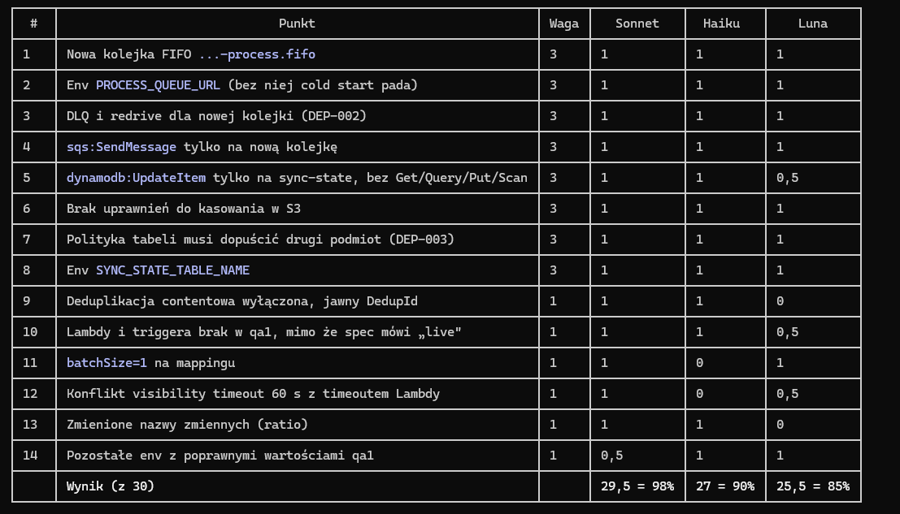
The skill described in this article was benchmarked using three models across two runs: Haiku 5.5, GPT-6-LUNA, and Sonnet 5.5 (as of October 20, 2026). Below is the benchmark breakdown:
From the specification, 14 items describing AWS resources to be created or modified (queues, Lambda, IAM, tables, environment variables) were extracted. Items that would cause a deployment failure or a security vulnerability were assigned a weight of 3; the rest were weighted 1. Each item's response was manually scored: complete (1), partial (0.5), or missing (0). The final score is the weighted sum divided by the maximum possible score.
-
Sonnet 5.5 captured the differences between the spec and AWS most accurately. It was the only model to catch the conflict between the 60-second visibility timeout of the input queue and the Lambda execution time, pointed out batchSize=1, and correctly described all IAM permissions.
-
Haiku 5.5 came in second. It broke down environment variables well and flagged invalid values in .env.example, but incorrectly considered the existing input queue compliant with the spec and missed the timeout conflict.
-
GPT-6-LUNA performed the weakest. It missed the content-based deduplication disablement and variable renaming, and noted the timeout conflict only as "unverifiable." However, the variance between models was smaller than the ranking suggests, and Luna's report remained largely useful.
When to Run the Analysis: Locally or in CI/CD?
The skill can be integrated into your SDLC guidelines so that every developer uses it before merging changes and attaches the generated report to the Pull Request description.
If your team uses automated reviewers (such as GitHub Reviewer), part of this process can be automated by adding the skill's instructions to the agent's configuration. The backend developer triggers the analysis manually on their branch, verifies the output, and—if the report is valid—includes its summary in the PR description.
This positions the report as supporting material for discussion with the DevOps team, rather than an automated infrastructure change decision.
Summary
The greatest value of this skill lies not in automated infrastructure design, but in making AWS requirements visible earlier—during change planning or before PR creation, rather than after a failed environment deployment.
Integrating this skill into backend developers' daily workflows eliminated the majority of the issues described at the beginning of this article.
In our case, we have hard data to back this up: The number of rejections and extra iterations dropped from an average of 6 down to 1 out of every 10 infrastructure-modifying requests.
Cycle times and process fluidity improved dramatically:
-
Cycle Time: Previously, communication lag with the DevOps team meant rework cycles could take over a day. Today, the process consistently wraps up within 2 hours maximum.
-
Lead Time: If work on a request begins immediately upon creation, resolution takes under an hour.
Unintended side effects on running environments have also become rare, as teams see the potential impact on other services in advance.
An added benefit is increased infrastructure awareness among backend developers. They gain a deeper understanding of the AWS services used by the application and can identify infrastructure implications earlier. They also expand the catalog of supported services, keeping project standards up to date. When the skill flags a service outside the established catalog during analysis, it gives the team a prompt to discuss that choice prior to deployment.
The goal was never to shift infrastructure responsibility onto AI or backend developers. The goal was to eliminate guesswork and incomplete requirements during testing. A well-designed process enabled us to catch gaps earlier, align backend developer and DevOps perspectives more smoothly, and minimize deployment surprises.

-1.png?width=1320&height=770&name=unity_220606_unity_team_of_teams_v1-kopia-2%20(1)-1.png)
-1-1.png?width=1320&height=770&name=unity_230509_unity_omnichannel_illustration_v3@2x%20(1)-1-1.png)